Posts

Digital Foundation_Assignment 10

Image
For this week's assignment, we are supposed to u se an Arduino to read a digital input to control a Servo Motor. At first, I tried to make a most basic circuit as pictures showed below. I connected one side to the servo, and connected the other side to the laptop. To input the data, I opened Arduino and selected the Servo-Sweep example. I ran this project and the servo worked as expected. Then I added a button to the whole circuit. By pressing the button, I can take control of the servo. When I press the button, the servo will start to turn around. However, I found that the servo cannot stop once you started it.

Digital Foundation_Assignment 9

Image
For this week's assignment, Min Huang and I worked in pair to create an alarm system using the Micro:bit. Due to the limited materials, we planned to use the sound sensor to receive the input data, and when the sound reached some degree, the servo will start to work as the out put action. We tried to use the similar code we learned in class to control the whole system. Considering that it is difficult to set accurate degree of the sound, we used an adjuster instead of the sound sensor. When we ran the project for the first time, the "heart" icon showed up, yet the servo failed to work. We spent lots of time debuging and finally found that the "on start" section was not necessary for this system. Additionally, we added more icons to help us make judgment of different conditions. Finally, the alarm system ran perfectly as we expected.

MSTU 5003_Final Project Idea

Image
Summary: - In a few sentences, concisely describe what this project is about. This project will be a portfolio website for Columbia University Chinese Soccer Team. Inspiration: - Why is making such a project important to you? For me, I am a sports fan and I have paid attention to some official website for professional football clubs I like. As a manager of Columbia University Chinese Soccer team, creating and operating social media platforms like WeChat official account and Instagram account, as well as seeking for sponsorship are important parts of my daily work. For my final project of this semester, I came up with an idea of creating a portfolio website for our soccer team. This website can be regarded as a graduation gift for both my team and myself at the time I'm saying goodbye to my school days. I have gotten inspiration from my favorite Chinese Football Club - Beijing Sinobo Guoan FC. Here are images for this FC's official account: http://www.fcguoan.c...

Digital Foundation_Assignment 7

Image
                    My micro:bit project for this week is a simplified compass. I have great interest for geography. When I found that there was a magnetometer inside the micro:bit, I decided to make a compass by reading its data. The code I wrote in micro:bit platform is as following: In micro:bit, we can use compass heading to read the direction indicator. After setting all the directions, we need to turn around the circuit board to correct the compass. Then press the x button, and  you will see the arrow which shows the north direction on screen. Especially, I found such compass may be not reliable when we use it in indoor environment.

Digital Foundation_Assignment 6

Image
This week, I used a piece of silk to make a shiny scarf. I found that the material I chose was suitable for scarves, and I would like to make this item a little bit different from a traditional one  with conductive threads. At the very beginning, I folded the silk and made it to the shape I want. I decided to sew a light up on  the center of the bow tie, which was easy for me to hide the circuit and make this scarf look better. Just like what we practice in class last week, I successfully completed the circuit and lighted the scarf up (as the picture shows above).  Nevertheless, there is a problem with this "shiny scarf" - people cannot wear such scarf with a heavy battery holder. This experimental product is better to be regarded as a decoration :)

Digital Foundation_Assignment 5

Image
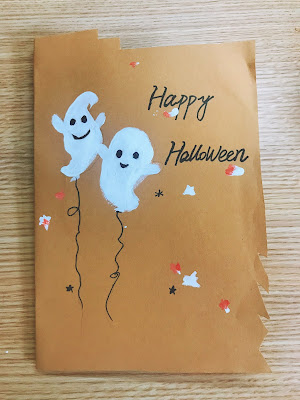
My pop-up card is designed with a topic of skull. To celebrate the incoming Halloween, I would like to add some cartoon figures of skulls and ghosts. On the cover of my card, I drew two lovely ghosts and wrote "Happy Halloween". When you open the card, a skull with two orange shiny eyes will pop up. I drew the outline of the skull on one paper, and craved it with a knife. Then I built the electric circuit on the other paper. I put the "skull" above the circuit and marked the location of two eyes. Finally, I connected with the battery and the card gave out the lights.